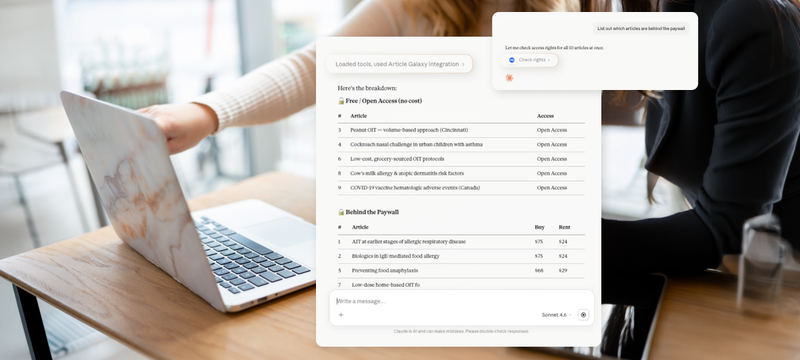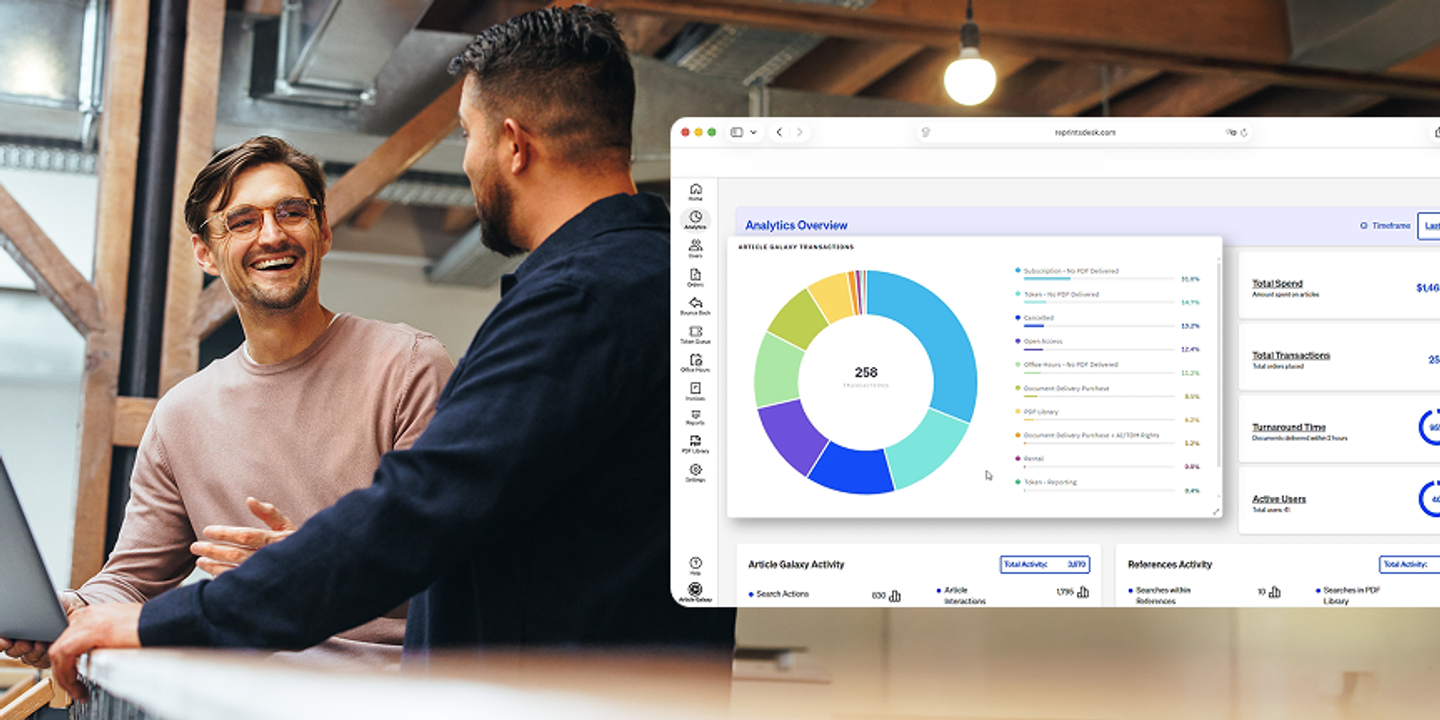
Your licensed literature library now travels with you into your preferred AI tools: Article Galaxy can now be found in the ChatGPT plugin directory and in Microsoft Copilot Marketplace. This accompanies a whole host of platform updates, covering how you order content, read it, organize references, and confirm your permissions.
- New Launch
- REST API & Platform Updates
- Client Admin Updates
- Article Galaxy Updates
- Article Galaxy References Updates
Article Galaxy Is Now In ChatGPT & Microsoft 365 Copilot
Ask for a paper where your work already starts, and get a compliant path to the full text.
AI assistants have become very good at surfacing scientific literature. What they cannot do on their own is tell you whether your organization holds the article, what it costs, or whether you are cleared to use it in an AI workflow. That answer lives in the entitlements, publisher agreements, and acquisition workflows you manage through Article Galaxy, and it is now available inside the assistant rather than in a separate tab.
Article Galaxy In ChatGPT
Mention @Article Galaxy in any ChatGPT prompt to check whether an article is available through your organization's entitlements, verify access and re-use rights, place a document order, and track order status with download links. Ordered PDFs are delivered through your Article Galaxy account, so the rights-respecting workflow your organization already trusts stays intact. The plugin is now available in the ChatGPT plugin directory and requires an Article Galaxy account with MCP access.
Article Galaxy In Microsoft 365 Copilot
Article Galaxy is available as a first-party integration for Microsoft 365 Copilot, developed in collaboration with Microsoft and running within Copilot's security and compliance framework. For organizations standardized on Microsoft 365, this means a research tool that meets the same standards as everything else approved in the environment.
Inside Copilot, you can check if a paper is available, see access options and pricing by DOI, get full text and Smart Citation content for accessible records, review re-use rights for different scenarios (including generative AI), and track your orders, usage, and quota. The integration is now on the Microsoft Marketplace.
Claude & Other MCP-Compatible Tools
Article Galaxy MCP already connects your library to Claude, Claude Code, Cursor, and other MCP-compatible assistants. A formal Claude directory listing is not available yet, so those connections continue to run through the Article Galaxy MCP server.
When you connect Claude, there is a dedicated authorization step. After signing in with your credentials or through SSO, an Authorization page asks you to explicitly approve the connection between your Article Galaxy account and Claude. This lets you review what you are granting before the connection is active.
Across all environments, the point is continuity. The subscriptions, licenses, and rights workflows your team has spent years assembling now apply wherever your researchers work, through one governed process instead of separate compliance checks for each AI platform.
REST API & Platform Updates
There is now a single REST API endpoint behind every availability check, expanded REST API support for reference management, and a faster foundation under all of it.
One REST API Endpoint For Every Check Availability Request
All Check Availability requests now flow through the REST API Check Availability endpoint, making it the single authority on article availability, pricing, and fulfillment options. Previously, different parts of the platform previously relied on separate implementations, which could return different answers depending on where a request started. Now, whether your team uses the interface, REST API, or an AI assistant, the availability information is consistent.
Article Galaxy References Management Through The REST API
The REST API now supports a broader set of Article Galaxy References operations, including tagging references, adding references to folders, and organizing folder content programmatically. Actions that were only available through legacy web services are now included. Integrated applications can manage a literature collection the way a researcher would in the interface, enabling richer MCP and AI-driven workflows.
Article Galaxy Now Runs On Vue 3
Article Galaxy now runs on Vue 3, the latest major version of its interface framework. Researchers will notice better responsiveness and stability in daily use. This upgrade also allows us to deliver new features more quickly in the future.
Client Admin Updates
Get quicker answers about account activity, users, and orders.
A Redesigned Admin Homepage
The Article Galaxy Admin Homepage is now a single workspace, not just a navigation starting point. Account analytics sit right on the page, including top active users, total spending, average turnaround time, and total orders, alongside quick links to Article Galaxy References, Article Galaxy Scholar, the REST API, and MCP resources. Tutorials, training, the blog, and support are all one click away, so the information you need for daily administration is in one place.
Analytics Charts You Can Read & Share
Analytics Dashboard charts have been rebuilt on eCharts, featuring legends with percentages and visual progress indicators. You can hover to highlight data points, see tooltips that stay visible inside the chart, and export any chart as a PNG with one click. Now, it's easier to compare trends and add figures to stakeholder updates.
Order Queues That Show Who & Where
The Admin Bounce Back, Admin Orders, and Token Queue interfaces now show Full Name, Username, and Delivery Email columns. The new table layout makes it easier to see key details that drive decisions. You no longer need to open each order to find out who placed a request or where the content is going, which makes a difference especially when working with a long queue.
User Status Without Opening A Profile
The Users Table in the Article Galaxy Admin interface now has a Status Column that shows whether each account is active or inactive. Troubleshooting an access issue or auditing your user list is a single scan rather than a sequence of profile visits.
Article Galaxy Updates
We’ve made sure it’s fewer steps between finding a paper and having it in hand, with more clarity about cost and rights along the way.
Order Form Now Adapts To What You’re Ordering
The Article Galaxy Order Form makes it easier to order the research materials you need, whether that’s a journal article, book chapter, conference proceeding, standard, technical report, patent, or another document type. Select the type of document you’re ordering, and the form adapts its fields, so you only fill in the information that citation requires. Required title fields are clearly marked, a dedicated Get Citation feature pulls citation details from a DOI or PubMed ID. You can place a single order or paste in multiple citations at once.
A new Details & Pricing button gives you a direct path from citation to acquisition. Account-level purchasing information now tells you when a request is covered by your organization's library team. If you need to correct a citation, you can now edit details directly from the Article Details page, without going back to the Order Form.
Already Purchased? Get The PDF Back Instantly
When duplicate detection is enabled for your account, Article Galaxy will recognize if you’ve already purchased an article and will re-deliver the PDF directly in your browser, along with an email containing access details. You no longer need to hunt through My Orders for the original request; duplicate detection is prioritized over other fulfillment paths (e.g., PDF Library, Open Access, subscriptions, and tokens), so content you already own reaches you by the fastest route available.
A Real Price Estimate & A Ceiling You Control
If the exact price of an article is not known when you order, Article Galaxy now shows an estimated price of $65.00 based on the current average instead of the older "PRICE TBD" message (clearly labeled as an estimate). The ordering process also enforces an article-level price limit, so if the actual price is higher, the order won't go through without your approval. You get a realistic sense of cost up front and protection against unexpected charges.
Order Language That Matches What Actually Happens
For order types that don’t involve purchasing a PDF, the Confirm Purchase button now reads Get Article, and the purchase confirmation message has been removed. The small wording change makes the interface clearer and more accurate about your actions.
Faster PDF Delivery Through Scite Sourcing
Article Galaxy now checks the Scite database first and delivers an available PDF to you before downstream processing finishes. Previously, delivery waited on the full business logic behind an order, such as pricing, token allocation, and subscription validation, which meant waiting for a file even if that file was already available. These checks still happen, but now you get the article first.
AI Summary: Decide Whether A Paper Is Worth Your Time
An AI Summary button will open a right-hand panel with a Scite-powered summary of the article you’re viewing, so you can judge relevance and key findings before committing to a full read. It is available in Article Galaxy, in the standard PDF Viewer, and in Article Galaxy References through both Article Details and the PDF Annotations Viewer. Reading environment no longer determines whether you get a summary, and an Article Galaxy References license is not required to use it while viewing PDFs.
Citation Intelligence, One Click From The Scite Badge
Citation context in Article Galaxy now uses the Scite badge. Click it to see Smart Citations for the article, organized by whether other publications support, mention, or contrast its findings. You can also click through to the full Scite report for more details. Smart Citations appear in a side panel or below the Order Form depending on where you are working. The older Related Articles list has been augmented with the same citation intelligence that shows how a recommended paper has been received.
Subscribed Content Without The Link-Out Detour
Article Galaxy now works with Third Iron's LibKey API to deliver authenticated, direct-to-PDF access for journals covered by your organization's subscriptions. Requests used to route out to publisher websites through the Holdings system, where they could fail if you were off the corporate network, hit a proxy authentication wall, or land on a page without a PDF. Where LibKey coverage exists, you get the article and avoid the detours.
AI & Text-And-Data-Mining Rights, Available To More Teams
Two new Intended Uses, Automated AI and Training LLM, are now available across all accounts. These are automatically evaluated against applicable re-use rights before an order can proceed. Eligible Open Access CC-BY content can be ordered under them, and publisher-specific rights overrides are respected where they apply, giving you clearer AI-specific options with licensing enforced for you rather than left to interpretation.
Behind that, Gen AI and text-and-data-mining rights configuration has moved from individual account setup to a central global setting. This equates to consistent availability across eligible accounts and a faster way to enable these features. Accounts with direct AI agreements with publishers will still follow those agreements, which take precedence over the standard workflow.
No Exact Match? A Clear Path To The Article Anyway
The "Not Found" message in Search Results now surfaces relevant alternatives and links you straight to the Order Form, so you can request the exact article you were after. Hard-to-locate content stops being a dead end but becomes another request you can make.
A Reading Experience That Works With Assistive Technology
Recent accessibility improvements cover navigation, readability, and assistive technology support across core Article Galaxy workflows, in alignment with ADA and WCAG standards. The Article Galaxy PDF Viewer was assessed against WCAG 2.1 Level AA, and targeted improvements are underway for the full-text reading experience. The UserWay accessibility framework has also been introduced in an invisible configuration, applying automatic fixes where needed without changing the interface or adding visible icons.
Article Galaxy References Updates
You can now manage larger collections, navigate faster, and keep more of your metadata when importing references.
Room For 50,000 Citations In A Single Folder
You can now import up to 50,000 records into a single folder, compared to the previous limit of 10,000 citations. Teams managing extensive publication lists no longer need to split their work across multiple folders, leading to less fragmentation and fewer places to look for the same project.
Bring Your Library With You: XML Import, Export, & ReadCube Tags
Article Galaxy References now lets you import and export XML files in EndNote XML format, opening up compatibility with EndNote-based workflows and custom pipelines that were not supported prior. Tag import has also expanded: exports from ReadCube now carry their Tags across, mapped automatically to native tagging in Article Galaxy References. If you are migrating from another reference manager, the organizational structure you built comes with you instead of being rebuilt by hand.
PDFs Open In The Full Annotations Viewer
For accounts licensed for Article Galaxy References, PDFs opened or delivered through Article Galaxy now launch in the PDF Annotations Viewer rather than the standard viewer; annotation, note-taking, and collaboration tools are right there in your reading experience.
Double-Click Straight Into Your Annotations
Double-clicking a citation with a PDF attached now opens the Annotations Viewer right away, whether you're in the PDF Library, My References, or any folder. This saves a navigation step for anyone working through long reference lists.
Choose How You Move Through A Folder
You can now switch between Infinite Scroll and Pagination directly in the folder view. Infinite Scroll is quick for browsing large collections; Pagination helps you keep your place and return to specific pages, and it is often the more workable option for anyone who finds continuous scrolling hard to use. Administrators set the default, but individual user can override it at any time.
Complete Author Lists Instead Of "Et Al."
The Authors Column now displays the full author list in My References, Shared Folders, Company Folders, and all other folder types, just like in the PDF Library. When you are distinguishing between similar publications or looking for a specific collaborator, the information you need is in the row rather than a click away.
Abstracts Inline In The PDF Library
Abstracts now appear inline by default within PDF Library result cards, matching the Search experience. You get about a 320-character preview with Show More and Show Less controls, so you can assess if an article is relevant without opening a separate panel.
Tags & Row Indicators You Can Read At A Glance
When you hover over a Tag icon in a citation row or column header, you now see the actual tag names, so you can tell how a reference is categorized without opening it. Tooltips have also been added to indicator icons in column headers, naming the Tags, Notes, Custom Fields, and PDF Annotations. Tags become more than labels. They give you a practical way to group, filter, and find content.
Purchased Articles Save Themselves To My References
Newly acquired content is immediately available for organizing and future access in My References. If you use References as your main literature hub, it stays complete without extra work.
Faster Navigation Across Your Collections
Performance work across the Company PDF Library, My References, My Shared Folders, and Company Shared Folders has made navigating references, opening PDFs, and adding new citations noticeably quicker. Less waiting between actions, more time in the work itself.
Clear Feedback When A PDF Has No Identifier
Adding or dragging in a PDF that contains no DOI or PubMed ID now generates a clear message in Article Details explaining that the required citation information is missing, as opposed to simply showing an empty view.
Put Summer 2026 To Work
Talk with your Account Executive about which of these updates apply to your account and what can be enabled to optimize your work. You can also book a demo to see Article Galaxy in action with ChatGPT and Microsoft 365 Copilot, using your own entitlements.