Claude does a great job finding research papers. Ask it for recent studies on a topic and it will surface real, relevant work. Then you hit the paywall, and Claude sends you back to your browser to check access, place an order, and download the PDF somewhere else. The find-it step and the get-it step live in separate tools, which adds extra steps to every project.
Connect Article Galaxy, and the paywall stops being a dead end. With it, Claude can search the literature, check your organization's access rights, and place an order, all inside the same conversation. The licensed PDF lands in your Article Galaxy account, the way any other order would. You stay in one thread from question to delivery.
How Access Works Through The Connector
Think of it as an order desk, not an archive. Claude sends Article Galaxy your requests one at a time, using the same permissions you have. What comes back is structured data: whether an article is open access, covered by your subscriptions, or available to buy, along with pricing, rights status, and metadata.
The article itself never goes to the model (neither for paywalled content nor after you buy it). The licensed PDF is delivered to you through your Article Galaxy account, under the same terms as any order you place directly. Finding a paper through search is different from giving its full text to an AI, and the connector holds that line.
Set Up The Connector Before You Read On
Everything past this point is a prompt you can run yourself. Connect Article Galaxy first and you can test each one as you go.
- Add Article Galaxy in Claude following the setup steps on the Article Galaxy MCP page, or under Extensions in your Article Galaxy account. If you already use Article Galaxy, your organization's license, permissions, and SSO carry over. Nothing to migrate, no new account.
- Complete the authentication prompts.
- Start a conversation and ask a literature question. Claude calls Article Galaxy when your request needs access, rights, or ordering.
Setup runs in a few minutes and doesn't require IT support. If your organization manages connectors centrally, an administrator may need to enable it first. The prompts that follow use your organization's Article Galaxy account; if you don't have one yet, a configured trial gives you the complete feature set rather than the limited free tier.
Tell Claude What You’re Looking For
You don’t need to use field tags or Boolean search. Just describe what you’re looking for.
“Show me 10 recent peer-reviewed studies on [topic], published since [year].”
Claude returns current, relevant work from the literature sources it's connected to. Name the population, method, or outcome you care about and the list gets sharper.
Find Out What You Can Reach
A list of papers is only useful if you can get to the full text. Ask Claude:
Which of these can I access, and how?
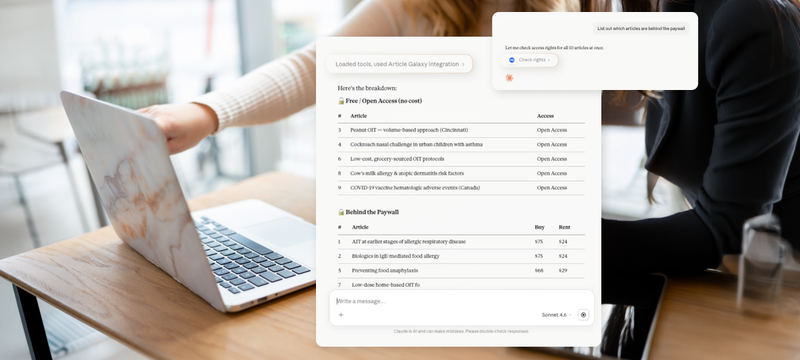
Article Galaxy checks the whole list and sorts it into open access, covered by your subscriptions, and available to purchase. Looking for open-access versions on your own can be tedious. The access check shows you these options, along with what is included in your subscriptions and purchases.
Order The Rest, With A Stop Before You Spend
For the paywalled items:
Order the paywalled articles.
Nothing is purchased automatically. Claude shows you the price and waits for your confirmation before an order goes through, so you keep control of your budget. Once an order clears, a download link appears in the conversation. The file comes from your Article Galaxy account, so there's no second login and no separate system to open.
Sort Out Reuse Rights Before A Deadline Forces It
Questions about rights tend to come up at the last minute, just before a submission is due. Bring them forward instead:
Show me the reuse rights for these articles in a table.
Article Galaxy maps each article to what your license permits: internal distribution, medical affairs use, regulatory submission, external distribution, and AI rights. For a team assembling literature for a regulatory filing or standing up a rights-cleared AI workflow, having that grid up front saves the scramble later.
Let Claude Handle Discovery & Access Together
Article Galaxy handles access and ordering. For the discovery and vetting side, we’d add Scite to the same Claude session. It surfaces citation context and credibility signals, so you can see how a finding has held up before you spend anything acquiring it. Article Galaxy then gets you to the licensed full text. Two connectors in one thread take you from question to vetted, licensed source.
What Reaches The Model & What Doesn't
The connector is scoped to you. It uses your credentials, your entitlements, and your quota, all enforced on Article Galaxy's side, with every action logged. Every request runs through your account one at a time, with your confirmation on anything that incurs a cost. The connector can't reach past your own permissions or pull content on its own. Claude connected through the MCP can do what you could do in Article Galaxy yourself, and nothing past that.
Analyzing an article's full text with AI is a separate matter. This requires a special AI rights grant for each article, and only works if the publisher is part of the program. There are strict limits: no model training, no permanent storage, only short excerpts with DOI attribution, and internal use only. Where a publisher hasn't opted in, the standard purchase path is unchanged and no AI-use option appears.
Frequently Asked Questions
Can Claude download a paywalled paper for me? Claude can find the paper, check your access, and place the order. The licensed PDF is delivered to your Article Galaxy account, not to Claude. The model works from structured data like availability, pricing, and rights status, never the article body.
Do I need a separate login to get the full text? No. The connector uses your existing Article Galaxy account and SSO, so ordering and download happen in the same conversation without a second sign-in.
Can Claude summarize the full text of an article I ordered? Only with a separate per-article AI rights grant, and only where the publisher participates. A standard purchase covers individual use, the same as always. AI analysis is a distinct licensed right.
Does this recognize my organization's subscriptions? Yes. The access check accounts for open access, your subscription entitlements, and titles you've already bought, so you're not charged twice for content you own.
Get Started
With Article Galaxy connected to Claude, start with a research question you’re working on. Ask for recent papers, check which ones you can access, and order what you need without leaving the conversation.
Ready to try more? The complete workflow guide includes prompts for bulk DOI checks, order tracking, and other tasks you can handle directly through Claude.
Free Live Webinar
Is Your AI Allowed to Read That? Reuse Rights In The Age Of AI & Agents, Explained Live